


Daily, employees spend almost 3 hours on tasks that no-code automation could handle automatically. Most of us know the drill – copying data between systems and sending identical follow-up emails repeatedly.
The numbers tell a compelling story. Companies that automate their workflows see their efficiency jump by up to 40% in the first year alone. The digital revolution has taken hold, as 84% of companies now use low or no-code tools to revolutionize their operations. These businesses cut their operational costs by 30-50% after automating their routine work.
No-code automation platforms are booming. Market projections show an impressive 31-38% compound annual growth rate, with the market value expected to hit $25 billion by 2030. The reason behind this surge is simple – no-code automation tools are now available to everyone, whatever their technical background.
This piece will guide you through no-code automation essentials, tool mechanics, and the top no-code automation tools 2025 offers. You’ll learn to design, implement, and expand no-code automation processes throughout your business without writing code.
Understanding No-Code Automation: The Basics
No-code automation transforms how businesses work today by breaking down technical barriers that made automation complex. These state-of-the-art tools give everyone in your organization the ability to automate workflows without programming knowledge.
What is no-code automation?
No-code automation tools and platforms let users build and manage automated workflows without writing code. These platforms help you automate repetitive tasks and streamline business processes through accessible interfaces instead of traditional programming methods [1].
Traditional development needs technical expertise, but no-code platforms use visual interfaces, pre-built components, and user-friendly features. This makes automation available to people with different technical skill levels [2]. The code still exists behind an accessible interface, which means you don’t need to write it yourself [3].
This technology gives automation power to people who understand business problems best—those who do the work every day [3]. Users can create automated workflows by connecting different applications. They set triggers and actions and create rules that control data flow between systems.
Projects built with no-code tools move up to 56% faster than traditional technologies. Businesses save up to 80% on service costs through better application management [1]. McKinsey reports that no-code applications could reduce development time by up to 90% [4].
How visual tools simplify workflow creation
No-code automation’s strength comes from its visual approach to building workflows. Users work with visual elements that represent different parts of an automated process instead of writing complex code.
Most platforms use drag-and-drop interfaces where pre-built components create functional workflows [4]. These visual builders help connect different actions and triggers logically—even for someone without technical knowledge.
A typical workflow follows this pattern:
- Set up a trigger (an event that starts the automation)
- Define specific actions to execute when triggered
- Enable the automation to run consistently [5]
Many platforms show visual maps or flowcharts of data movement through automation. Make’s visual-first platform lets you watch data flow through your automation in real-time. This helps you understand and fix your workflows better [6][4].
Pre-built templates and connectors make the process easier by providing starting points you can customize. These templates offer ready-made solutions for common business scenarios, so you don’t need to start from scratch [4].
Benefits for non-technical business owners
Business owners without technical backgrounds gain several advantages that improve their operations and results.
The most important benefit is better productivity. Teams focus on strategic activities when repetitive tasks like data entry, file organization, and report generation become automated [3]. Companies often see productivity improvements up to 40% in the first year.
Cost reduction makes no-code automation attractive. No-code platforms use subscription models that cost less than custom development or IT team expansion [3]. These tools work well for businesses of all sizes, offering an affordable way to automate processes whatever your company’s size [1].
The flexibility of no-code automation gives businesses an edge. Owners can adapt to market changes by modifying existing workflows or creating new ones quickly [7]. This quick response ability provides advantages in today’s ever-changing business world.
No-code platforms promote teamwork and state-of-the-art solutions. Your non-technical employees create their automation solutions, which promotes a culture of continuous improvement. Team members help improve operations [8]. This shared approach to technology reduces bottlenecks and speeds up improvements across departments.
Visual Thinking: How Triggers and Actions Work
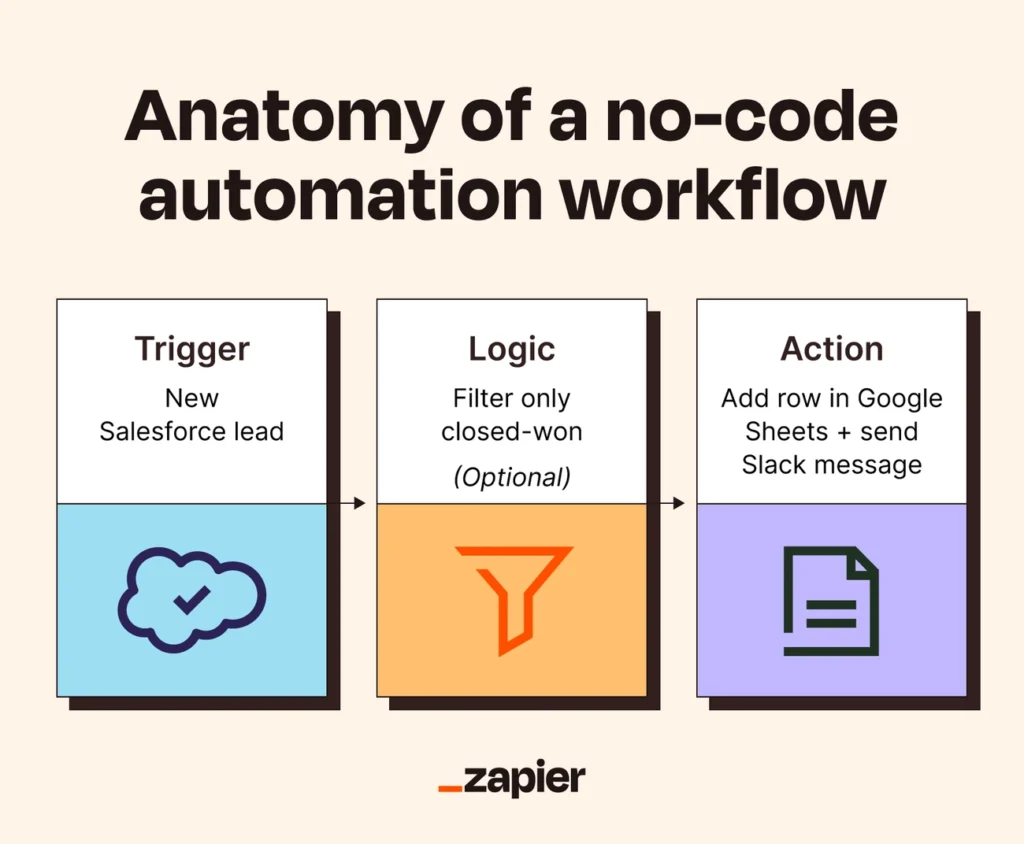
Image Source: Zapier
A simple yet powerful concept drives every successful no-code automation: the trigger-action relationship. This visual approach to building workflows is the foundation of these systems. Anyone can create sophisticated automations without writing code.
What is a trigger?
A trigger is the event that starts an automation—like a starting pistol for your entire process. You can think of triggers as the “if” in every automation’s “if-then” statement or the “on-switch” that tells your system to start working. Automations would sit idle without triggers and need manual activation.
Triggers exist in several forms based on automation needs:
- Event-based triggers activate right away when specific events happen in connected systems, like getting a form submission or closing a deal in your CRM
- Time-based triggers run at scheduled intervals—daily, weekly, or at exact times
- Data-based triggers fire when data is created, modified, or meets specific criteria
- User-action triggers respond to specific behaviors users take within applications
The right trigger can make your automation much more effective. To name just one example, see how a marketing email triggered by actual customer behavior works better than one sent randomly.
What is an action?
Triggers are the starting pistol, and actions are the runners sprinting down the track. Actions are specific tasks your no-code automation performs after a trigger activates. These steps would need manual effort otherwise.
Actions usually include:
- Sending emails or notifications
- Updating records in databases
- Creating tasks or tickets
- Moving files between systems
- Posting messages to communication channels
Most no-code automation platforms let you pick actions from a simple list and set them up through user-friendly interfaces. The system handles all background coding and API calls, which saves you from technical complexities.
You can chain multiple actions together from a single trigger. This creates sophisticated workflows that perform several tasks in sequence and allows complex business processes to run with remarkable precision.
Examples of common trigger-action pairs
This simple cause-and-effect relationship creates the foundation of all no-code automation. Here are some practical examples that show how triggers and actions work together:
- Trigger: A customer submits a feedback form on your website. Actions: 1) Analyze the sentiment using AI, 2) If negative, create a high-priority support ticket, 3) Send a personalized response to the customer.
- Trigger: A new invoice arrives via email. Actions: 1) Extract relevant information like amount and due date, 2) Update the accounting system, 3) Send a notification to the finance team, 4) Schedule a payment reminder.
- Trigger: A deal in your CRM moves to “Closed Won” status. Actions: 1) Post a celebratory message in your team’s Slack channel, 2) Create onboarding tasks for the customer success team, 3) Send a welcome email to the new client.
- Trigger: A new video file appears in a specific Dropbox folder. Actions: 1) Notify the marketing team with the file link, 2) Add the video to your content calendar, 3) Schedule social media posts.
This visual thinking approach mirrors how we naturally envision processes: when this happens, do that. No-code automation tools make advanced automation available to those with no programming background by breaking down complex business operations into these simple trigger-action relationships.
The visual approach lets business owners see their workflows, understand data movement through systems, and spot opportunities for optimization. That’s why no-code automation has become so user-friendly for non-technical users to adopt and implement in their organizations.
Best No-Code Automation Tools 2025: A Visual Comparison
Your business can transform manual processes into smooth workflows faster when you pick the right no-code automation tool. Let’s look at the top platforms that are changing how we work in 2025.
1. Zapier
Zapier shines as an AI orchestration platform that connects with 8,000+ pre-built connectors to help businesses create sophisticated workflows across their tech stack [9]. Users can build custom automations through a visual workflow builder that includes conditional paths, data formatting, and trigger scheduling.
The platform’s Copilot feature stands out because it builds complex automations from natural language prompts—making it easy for beginners to use. The new Zapier Tables feature lets you store and analyze data in one place [9].
The platform uses task-based pricing instead of charging per user, with plans starting at €19.07/month [10]. Large organizations save money with this model compared to paying per-seat licensing fees [9].
2. Make
Make, previously Integromat, shows its strength through a visual-first approach to advanced workflows. Users can watch their data flow through automations in real-time on a clean interface, and the platform handles complex data operations and scaling workflows smoothly [10].
Make packs more powerful features than its competitors:
- Advanced data mapping and transformation
- Sophisticated error handling
- Detailed flow control capabilities
Plans start at just €8.59/month [10], making these advanced features available to businesses of any size.
3. Airtable
Airtable brings something unique by combining database features with automation tools. This platform works best when your workflow centers around structured data management [11].
The platform offers fewer native integrations than pure automation tools [11], but it organizes information beautifully through customizable views (Grid, Kanban, Calendar) and rich field types [2]. Anyone familiar with spreadsheets will feel at home using it [2].
Teams focused on database automation will find good value in the paid plans, which start at €9.54/user/month [2].
4. Microsoft Power Automate
Microsoft Power Automate offers a strong low-code experience that fits perfectly with other Microsoft tools. Users can automate cloud flows, robotic process automation (RPA), and process mining [4].
Microsoft has added AI-driven conversation features to Power Automate in 2025. Now users can describe flows in natural language [4]. This new AI copilot helps you build and modify every workflow from the flow designer.
Desktop flows handle automation for Windows applications and services, while Power Automate Process Mining helps you learn about your data to speed up operations [4].
5. Vellum AI
Vellum AI has carved out its niche as a platform for building AI workflows and agents without code. You can create complete AI workflows just by describing what you want in the natural-language Agent Builder [12].
The platform comes with distinctive features:
- Create AI workflows in minutes using natural-language prompts
- Work together smoothly on a shared canvas
- Built-in evaluations and versioning
Teams looking to add AI to their automation strategy can start with Vellum’s free tier, while paid plans begin at €23.86 per month [12].
6. Tray.io
Tray.io serves as an enterprise-grade automation solution with a powerful visual builder for complex logic and data transformation [12]. Large-scale operations benefit from its sophisticated workflow capabilities.
The platform goes beyond basic tools by offering enterprise-grade security (SOC 2, HIPAA compliance) and strong governance features [13]. You won’t need to worry about provisioning or traffic spikes thanks to its serverless architecture—whether you process 100 leads daily or 1 million data points hourly [13].
How to Choose the Right Tool for Your Business
Choosing the right no-code automation platform goes beyond features and pricing. Your business’s unique needs, tech stack, and future goals should guide this vital choice.
Integration with your existing apps
The platform’s natural connection with your current technology ecosystem is a key factor in selecting a no-code automation tool. Even the most powerful automation platform becomes useless if it fails to work with your existing systems.
Enterprise applications need to work with ERP systems, CRMs, HR platforms, databases, and legacy mainframes [6]. Look for no-code automation platforms that provide extensive pre-built connectors for common business applications. These connectors manage technical complexity behind the scenes. This lets you build workflows without getting caught up in technical integrations.
Here’s what to assess in integration capabilities:
- The range of pre-built connectors (platforms like Zapier offer over 8,000 app connections) [14]
- API flexibility for custom integrations where pre-built connectors don’t exist
- Database connectivity options to read and write data
- Webhook support for live event handling
The platform should work well with your industry’s core systems. Your chosen tool should help you build cross-system automations without rebuilding your entire tech stack [15].
Ease of use and learning curve
No-code automation tools shine because they’re available to non-technical users. But platforms differ in how user-friendly they are and how fast users learn them.
The best platforms have accessible visual builders, drag-and-drop interfaces, and simple configuration options [15]. Business users can design and deploy workflows without constant IT help. Great platforms make automation simple while supporting complex business processes.
Key factors in assessing ease of use include:
- Auto-generated descriptions for workflow steps that improve understanding [16]
- Vertical orientation in workflow builders for better reading
- Clear step numbers and visual flow indicators
- Drag-and-drop field mapping between apps
Note that some platforms trade simplicity for power. To name just one example, Bubble offers great flexibility but needs users to learn its visual programming language [14]. This trade-off might work well based on your team’s technical skills and automation needs.
Security, scalability, and support
Your automation platform should grow with your business while staying secure and reliable. Security, scalability, and support are vital for long-term success.
Security-focused platforms should offer enterprise-grade protection with:
- Data encryption at rest and in transit
- Role-based access controls (RBAC) to restrict workflow creation and changes
- Complete audit logging to track system activities
- Industry-specific compliance certifications (SOC 2, GDPR, HIPAA) [16]
Scalability helps your automation solution handle more work as you grow. The platform should have:
- Cloud architecture that grows without infrastructure changes
- Support for high-volume, multi-branch workflows [12]
- Performance dashboards to spot bottlenecks
- Flexible pricing that matches your usage
The vendor’s support system matters too. As automation spreads across your organization, good support resources become crucial [15]. Look for detailed documentation, quick customer service, active user communities, and training materials to help your team get the most from the platform.
A careful review of these three areas—integration capabilities, ease of use, and security/scalability/support—helps you pick a no-code automation platform that serves your current and future business needs.
Designing Your First Automation Visually
You’ve picked your no-code platform, and now it’s time to build your first automation. Building complex business workflows starts with simple steps, so don’t let the process overwhelm you. A hands-on project will teach you more than any tutorial.
Start with a simple use case
Your first automation should target a specific pain point in your business operations. Look for tasks that are:
- Repetitive and performed frequently
- Manual and time-consuming
- Prone to human error
- High-volume but low-complexity
Pick something small enough to finish quickly but valuable enough to show clear benefits. Many automation platform users built their first versions in just one afternoon. The core actions or “must-happen” steps should be your focus. This lets you see results fast without getting stuck in complexity.
Use templates or drag-and-drop builders
No-code platforms give you two ways to create your first automation: building from scratch or using templates. Templates work best when you’re new to automation.
Templates automate common tasks with pre-made scenarios that give you a working foundation to customize. Just connect your app accounts and tweak settings to match your needs. The visual builders let you design workflows with drag-and-drop interfaces. You can place components on a canvas and connect them logically.
These interfaces turn complex programming concepts into visual elements. A shared visual language makes diagrams easy to understand. The tools map prompts, actions, and connectors into well-laid-out flows. This makes the process user-friendly for non-technical users.
Test, iterate, and improve
Your automation needs thorough testing with ground scenarios. The team’s daily users should walk through actual examples. They can spot unclear or problematic areas. This hands-on testing shows edge cases you might miss.
Check how your automation handles wrong or missing data. Pay attention to timing, notifications, and naming rules. Get feedback from different users. New team members might find confusing instructions, while experienced staff could spot missing steps or bottlenecks.
This input helps refine your workflow. You can adjust sequences and clarify decision points. Each automation gets better after launch through gradual improvements in stability and accuracy. A simple start, thorough testing, and constant improvement lead to successful automation.
Scaling No-Code Automation Across Teams
The challenge of scaling solutions emerges right after your first successful automation. Recent studies show 83% of enterprises run active citizen development programs that let non-technical users create business applications [1].
Standardize workflows to stay consistent
Scaling needs a different mindset than repeating the same process multiple times. Finding the right balance is crucial. Too much standardization blocks breakthroughs, while too little leads to chaos [1]. You need architectural patterns and integration standards, yet stay flexible about accessible design and specific workflow steps.
Component libraries that promote reuse and central documentation tools like Notion or Coda [8] are essential. These tools help build your organization’s capabilities through shared knowledge instead of scattered success stories.
Train team members to create their own automations
The BRIDGE framework leads to successful automation training: Build Confidence, Relate to Real Work, Include Hands-On Practice, Demonstrate Quick Wins, Give Ongoing Support, Evaluate and Iterate [17].
Your team’s tech comfort level and learning priorities need assessment before training [17]. A detailed program should include:
- Sessions that introduce platform benefits
- Interactive workshops that encourage experimentation
- Learning paths customized to specific job roles [18]
Look for passionate “champions” in each department who can handle their team’s workflows [19].
Monitor and optimize regularly
Create ways to capture and share what works. Look beyond just counting applications—track business value, user adoption, component reuse, and deployment speed [1].
Start performance testing early in development to avoid bottlenecks [20]. No-code environments need specific tools to track response times, throughput, error rates, and resource use [20].
Plan check-ins at set times (1 week, 1 month, and 3 months after the original training) to solve problems and showcase new features [17].
Conclusion
No-code automation brings a transformation for business owners who want to get rid of repetitive tasks without complex programming. This piece shows how visual tools can turn tedious manual processes into efficient workflows that run by themselves. The numbers tell a compelling story – businesses of all sizes see up to 40% better productivity and 30-50% lower costs with no-code automation.
These platforms stand out because anyone can use them. The accessible interface uses simple trigger-action relationships that let non-technical staff create complex automation workflows. Your marketing team can build customer experiences. Your sales department can automate follow-ups. Your operations staff can improve data management. They can do all this without writing code.
The right platform choice depends on your existing tech stack, user needs, and long-term business goals. Zapier shines with its big library of integrations. Make offers advanced visual workflows. Airtable combines database functionality with automation. Microsoft Power Automate works naturally with Office 365 applications. Your specific needs will point you to the platform that works best.
Note that successful automation starts small but aims high. Start with simple, high-impact processes before you expand to other departments. Good standardization, training, and regular improvements build the foundation for company-wide adoption. This step-by-step approach will give you consistent results while keeping things manageable.
No-code automation puts digital transformation in your hands without needing technical expertise. Start your automation experience today with one workflow that fixes a specific problem. On top of that, you might want to find more ways to improve your business efficiency.
Key Takeaways
No-code automation transforms business operations by eliminating repetitive tasks through visual, drag-and-drop interfaces that require zero programming knowledge. Here are the essential insights every business owner should know:
• Start simple and scale smart: Begin with one high-impact, repetitive task before expanding across departments to achieve 40% productivity gains and 30-50% cost reductions.
• Choose platforms based on integration needs: Evaluate tools like Zapier (8,000+ connectors), Make (visual workflows), or Power Automate (Microsoft ecosystem) based on your existing tech stack.
• Master trigger-action thinking: Every automation follows “when this happens, do that” logic—understanding this visual relationship unlocks unlimited workflow possibilities.
• Prioritize training and standardization: Create component libraries, train team champions, and establish consistent workflows to successfully scale automation across your organization.
• Test thoroughly before deployment: Use real-world scenarios and gather feedback from actual users to refine workflows and handle edge cases effectively.
The no-code automation market is exploding with 31-38% annual growth, reaching $25 billion by 2030. This isn’t just a trend—it’s the future of business efficiency, putting enterprise-level automation capabilities directly in the hands of non-technical business owners.
FAQs
Q1. What is no-code automation and how can it benefit my business? No-code automation allows you to create automated workflows without writing code, using visual interfaces. It can increase productivity by up to 40% and reduce operational costs by 30-50% by eliminating repetitive tasks and streamlining processes.
Q2. How do I choose the right no-code automation tool for my company? Consider factors like integration capabilities with your existing apps, ease of use, security features, scalability, and available support. Popular options include Zapier for its wide range of integrations, Make for advanced visual workflows, and Microsoft Power Automate for businesses using Office 365.
Q3. Can non-technical employees really create effective automations? Yes, no-code platforms are designed for users without programming skills. They use intuitive visual interfaces and drag-and-drop components, making it possible for anyone to create sophisticated workflows. Many platforms also offer templates and AI-assisted tools to further simplify the process.
Q4. What’s the best way to start implementing no-code automation in my organization? Begin with a simple, high-impact use case that addresses a specific pain point. Use templates or drag-and-drop builders to create your first automation. Test thoroughly, gather feedback, and iterate. As you gain confidence, gradually expand to more complex workflows and train team members to create their own automations.
Q5. How can I ensure successful adoption of no-code automation across my company? Standardize workflows for consistency, create a comprehensive training program for employees, and identify enthusiastic “champions” in each department. Regularly monitor performance, optimize workflows, and provide ongoing support. Establish mechanisms for sharing lessons learned and track metrics that demonstrate business value to encourage widespread adoption.